

Introduction
In this article you will learn about the Web Form Web API project Template.
ASP. NET Web API Forms Web API Project Template
We know that the ASP.Net Web API is a framework that helps to make it easy to create HTTP services to provide the responses to the client depending on their request. HTTP services reaches a broad range of clients and also includes the browsers and mobile services.
Generally when we create a Web API, first we need to select the MVC4 Web Application Project Template then we get the option to use the Web API. This template has many options and therefore creates a little confusion for making Web API application. When you have the need to create the Web API in a Web Form project, you can create it but through the Add New Item features. Now we make it easy by using this template.
The ASP. NET Web Form Web API project template creates a new Web Form project providing the infrastructure required for creating the Web API in Web Forms projects. When we use the ASP. NET Web API Form Web API Project Template then it creates a folder "Api" and creates a dummy API controller that is "Values Controller".
To use this Project Template, first we need to install it. We can install it from this Link: ASP. NET Web API Forms Web API Project Template
After installing it we can use it in Visual Studio. For checking it use the following procedure:
- Open Visual Studio 2012.
- Select "New Project" -> "Visual C#".
- Now Choose "ASP. NET Web Form Web API Application".
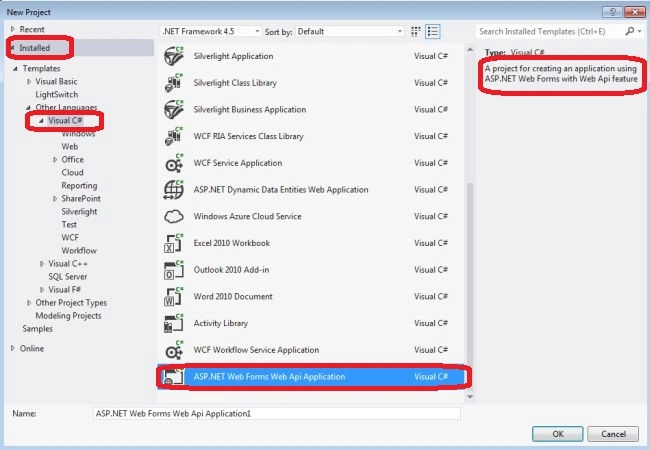
Now look the changes in Visual Studio..
When we create the ASP. NET Web Form Web API Project Template it makes many changes in the project. These changes are as follows:
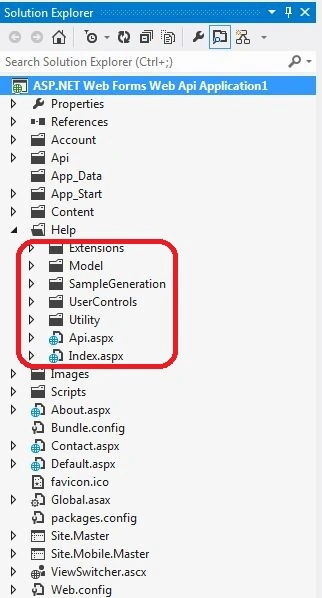
- It adds a Help folder. This folder contains the various files:
Extension
Model
SampleGeneration
UserControls
Utility
Api.asax
Index.aspx
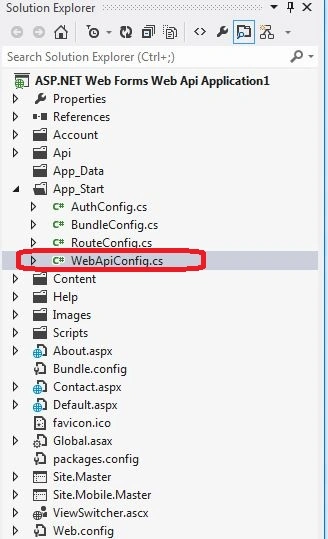
- Add the WebApiConfig.cs file in the App_Start folder. This contains the single register method, by using this method we register the Web API routes.
- It modifies the Global.asax.cs->Application_Start method that calls the webApiConfig Register method.
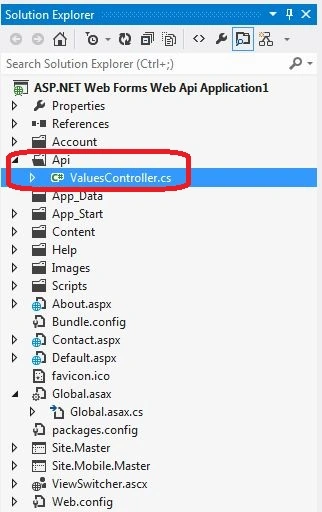
- There is a new Api folder added that creates a dummy controller, which is ValuesController.
Now here are the screenshots of the Solution Explorer that contains many changes.
Join the conversation! Your thoughts help the community grow.