

ASP.NET Web API is a framework for building the HTTP services to reach a browser, mobile device and many other clients, it is an ideal platform for building RESTful application.
In this article we will see how to create a RESTful application using ASP.NET WEB API with entity framework.
Create an empty WEB API application using an installed web template in visual studio as in the following figures:
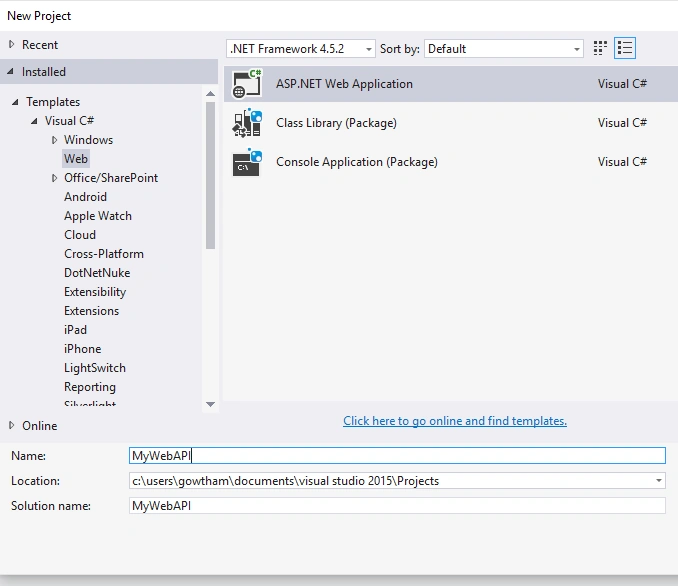
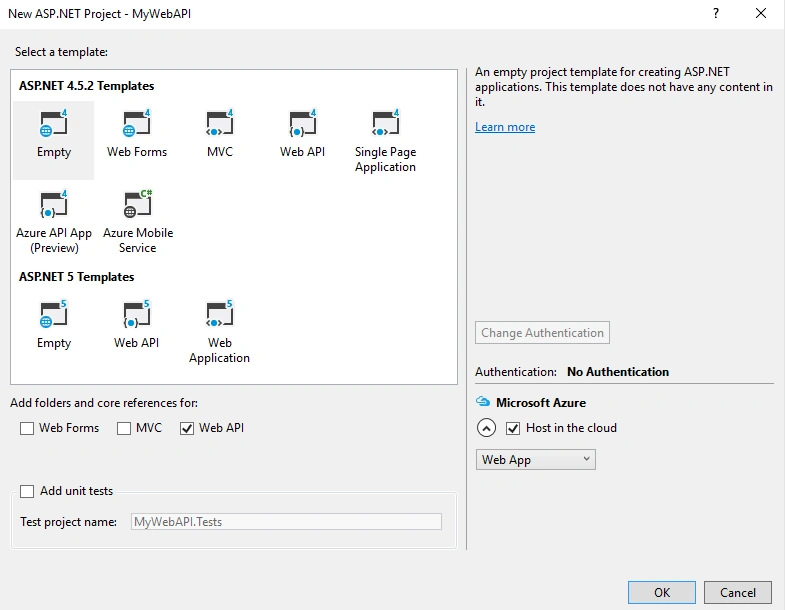
Let me start from creating model classes.
In the solution explorer, right click the model folder, select ADD, then Class and name it as Department, write the following code,
- public class Department
- {
- [Required]
- public int DepartmentID { get; set; }
- [Required]
- public string DepartmentName { get; set; }
- }
Add another class and name it as Employees and write the following code,
- public class Employees
- {
- [Required]
- public int EmployeeID { get; set; }
- [Required]
- public string FirstName { get; set; }
- public string LastName { get; set; }
- public int DepartmentID { get; set; } //Foreign Key
- public Department Department { get; set; } //Navigation Property
- }
Entity Framework will create database table based on the model classes.
DepartmentID - defines the foreign key into the Department table.
The employee class contains the navigation property to the related department table.
Add Web API Controllers
Note: Before adding the controller build your application once.
Let us create Web API controllers that support CRUD operations.
In Solution Explorer, right-click the Controllers folder. Select Add, then Controller.
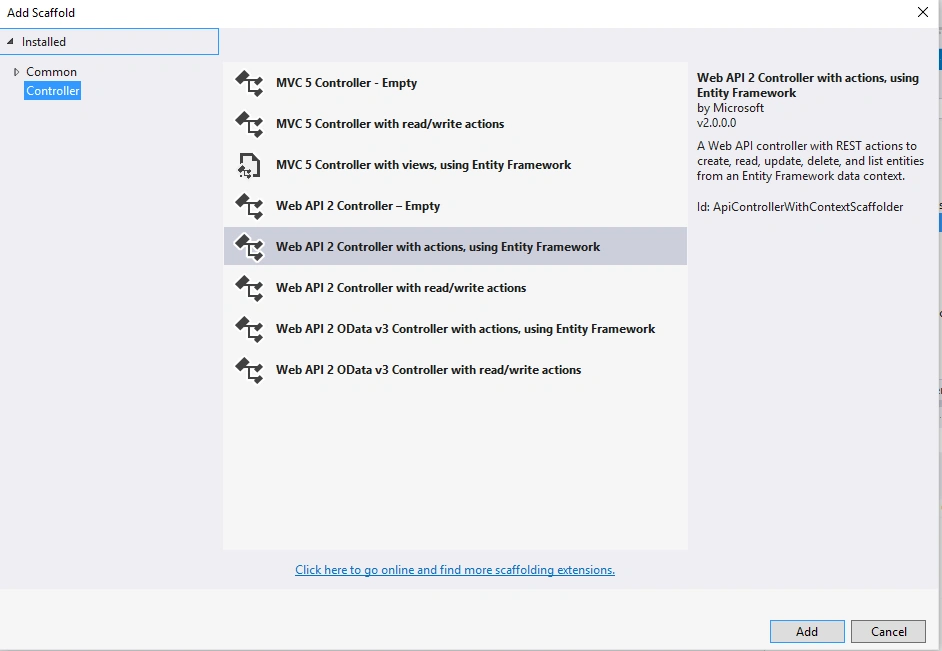
- Add the Model class,
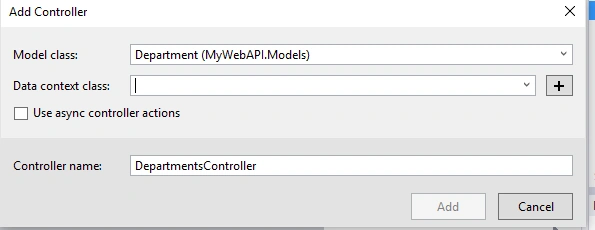
Figure 4 - Click on + icon button and add the Department context class,
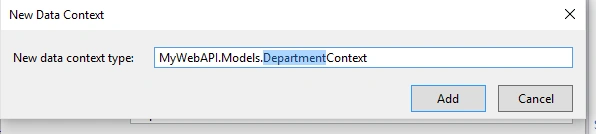
Figure 5
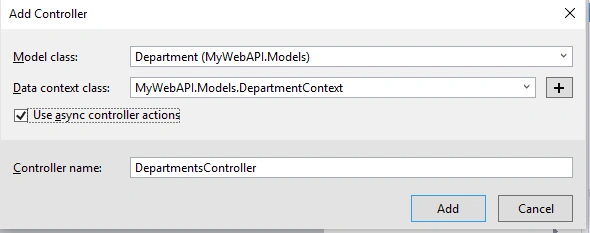
Figure 6
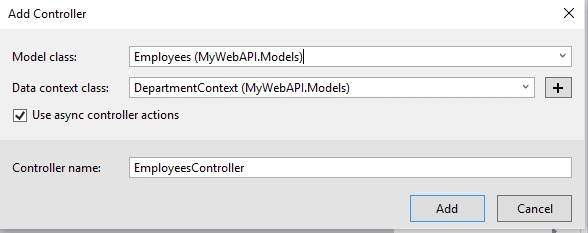 .
. - public class DepartmentContext : DbContext
- {
- public DepartmentContext() : base("name=DepartmentContext")
- {
- }
- public System.Data.Entity.DbSet<MyWebAPI.Models.Department> Departments { get; set; }
- public System.Data.Entity.DbSet<MyWebAPI.Models.Employees> Employees { get; set; }
- }
Now, open the Package manager console and enter the following commands,
- Enable-migrations
This will add the folder called migration with code file named configuration.cs as shown in figure 8,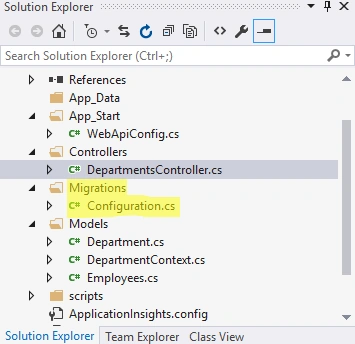
Figure 8 - Add-Migration Initial
This will create a database,
Figure 9
Check your Web config file and ensure the SQL connection string,
Open configuration.cs file under migration folder and add the following code in seed method,- context.Departments.AddOrUpdate(new Department { DepartmentID = 1, DepartmentName = "Infrastructure" },
- new Department { DepartmentID = 2, DepartmentName = "HR" });
- context.Employees.AddOrUpdate(new Employees { EmployeeID=1,FirstName="Raja",LastName="Sekar",DepartmentID=1},
- new Employees { EmployeeID=2,FirstName="Arun",LastName="Kumar",DepartmentID=1},
- new Employees { EmployeeID=3,FirstName="Pradeep",LastName="Raj",DepartmentID=2});
- Update-Database
This will run the seed method,
Figure 10
Check you database which is created,
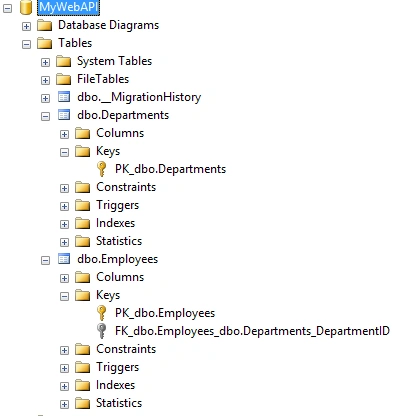
Figure 11
This is my Department table,
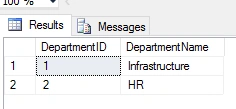
Figure 12
This is my Employee table,
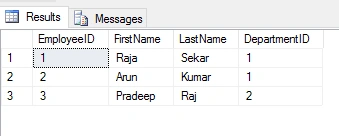
Figure 13
Now our API's are ready:
Department API's,
GET: api/Departments – Get the Department records.
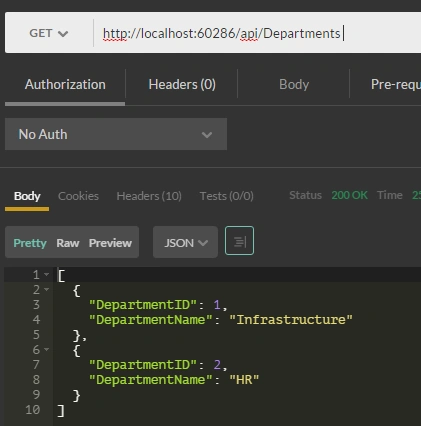
Figure 14
GET: api/Departments/{department ID} – Get the Department Records based on ID.
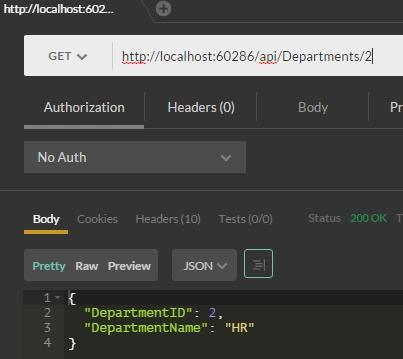
Figure 15
POST: api/Departments – add the new record in department using this API,
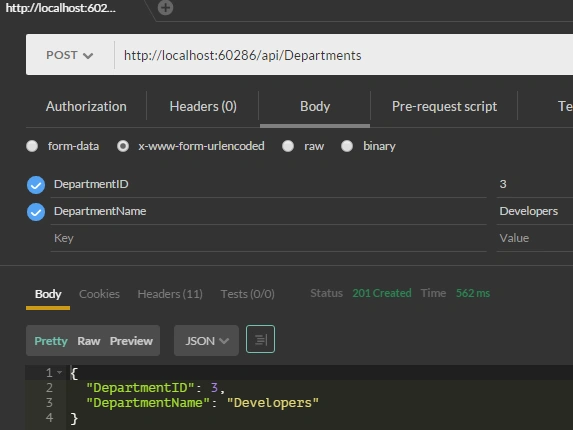
Figure 16
PUT: api/Departments/5 – update the department data based on id,
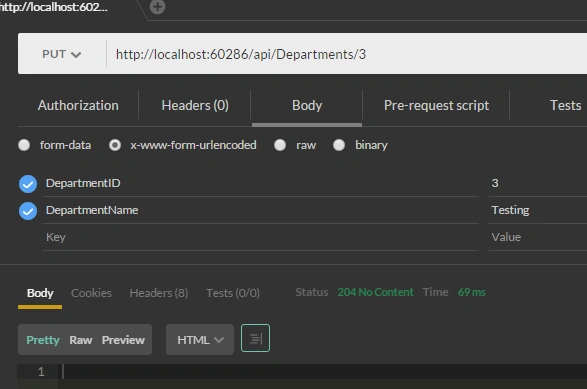
Figure 17
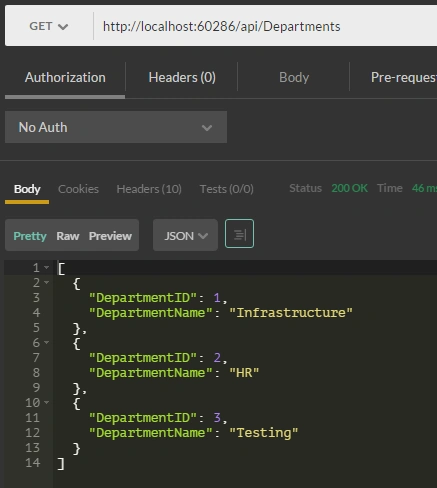
Figure 18
DELETE: api/Departments/5—delete the record in department table using this API.
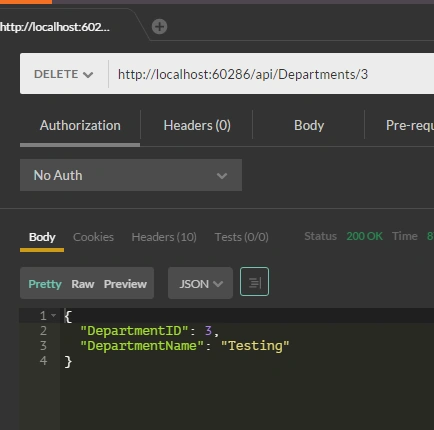
Figure 19
This article is going long and long, there are more things need to be discussed regarding the topic, so in part- 2 let me share something about handling the related entities and routing in ASP.NET WEB API.
I hope you have enjoyed this article. Your valuable feedback, question, or comments about this article are always welcomed.
ROOHI ZUWAIRIYAHPosted Dec 14, 2017, 12:29 AM
I am getting error after the update-database command. Specify the '-Verbose' flag to view the SQL statements being applied to the target database.System.Data.SqlClient.SqlException (0x80131904): A network-related or instance-specific error occurred while establishing a connection to SQL Server. The server was not found or was not accessible. Verify that the instance name is correct and that SQL Server is configured to allow remote connections. (provider: SQL Network Interfaces, error: 50 - Local Database Runtime error occurred. The specified LocalDB instance does not exist. ) at System.Data.SqlClient.SqlInternalConnectionTds..ctor(DbConnectionPoolIdentity identity, SqlConnectionString connectionOptions, SqlCredential credential, Object providerInfo, String newPassword, SecureString newSecurePassword, Boolean redirectedUserInstance, SqlConnectionString userConnectionOptions, SessionData reconnectSessionData, DbConnectionPool pool, String accessToken, Boolean applyTransientFaultHandling) at System.Data.SqlClient.SqlConnectionFactory.CreateConnection(DbConnectionOptions options, DbConnectionPoolKey poolKey, Object poolGroupProviderInfo, DbConnectionPool pool, DbConnection owningConnection, DbConnectionOptions userOptions) at System.Data.ProviderBase.DbConnectionFactory.CreatePooledConnection(DbConnectionPool pool, DbConnection owningObject, DbConnectionOptions options, DbConnectionPoolKey poolKey, DbConnectionOptions userOptions) at System.Data.ProviderBase.DbConnectionPool.CreateObject(DbConnection owningObject, DbConnectionOptions userOptions, DbConnectionInternal oldConnection) at System.Data.ProviderBase.DbConnectionPool.UserCreateRequest(DbConnection owningObject, DbConnectionOptions userOptions, DbConnectionInternal oldConnection) at System.Data.ProviderBase.DbConnectionPool.TryGetConnection(DbConnection owningObject, UInt32 waitForMultipleObjectsTimeout, Boolean allowCreate, Boolean onlyOneCheckConnection, DbConnectionOptions userOptions, DbConnectionInternal& connection) at System.Data.ProviderBase.DbConnectionPool.TryGetConnection(DbConnection owningObject, TaskCompletionSource`1 retry, DbConnectionOptions userOptions, DbConnectionInternal& connection) at System.Data.ProviderBase.DbConnectionFactory.TryGetConnection(DbConnection owningConnection, TaskCompletionSource`1 retry, DbConnectionOptions userOptions, DbConnectionInternal oldConnection, DbConnectionInternal& connection) at System.Data.ProviderBase.DbConnectionInternal.TryOpenConnectionInternal(DbConnection outerConnection, DbConnectionFactory connectionFactory, TaskCompletionSource`1 retry, DbConnectionOptions userOptions) at System.Data.ProviderBase.DbConnectionClosed.TryOpenConnection(DbConnection outerConnection, DbConnectionFactory connectionFactory, TaskCompletionSource`1 retry, DbConnectionOptions userOptions) at System.Data.SqlClient.SqlConnection.TryOpenInner(TaskCompletionSource`1 retry) at System.Data.SqlClient.SqlConnection.TryOpen(TaskCompletionSource`1 retry) at System.Data.SqlClient.SqlConnection.Open() at System.Data.Entity.Infrastructure.Interception.DbConnectionDispatcher.<Open>b__36(DbConnection t, DbConnectionInterceptionContext c) at System.Data.Entity.Infrastructure.Interception.InternalDispatcher`1.Dispatch[TTarget,TInterceptionContext](TTarget target, Action`2 operation, TInterceptionContext interceptionContext, Action`3 executing, Action`3 executed) at System.Data.Entity.Infrastructure.Interception.DbConnectionDispatcher.Open(DbConnection connection, DbInterceptionContext interceptionContext) at System.Data.Entity.SqlServer.SqlProviderServices.<>c__DisplayClass33.<UsingConnection>b__32() at System.Data.Entity.SqlServer.DefaultSqlExecutionStrategy.<>c__DisplayClass1.<Execute>b__0() at System.Data.Entity.SqlServer.DefaultSqlExecutionStrategy.Execute[TResult](Func`1 operation) at System.Data.Entity.SqlServer.DefaultSqlExecutionStrategy.Execute(Action operation) at System.Data.Entity.SqlServer.SqlProviderServices.UsingConnection(DbConnection sqlConnection, Action`1 act) at System.Data.Entity.SqlServer.SqlProviderServices.UsingMasterConnection(DbConnection sqlConnection, Action`1 act) at System.Data.Entity.SqlServer.SqlProviderServices.CreateDatabaseFromScript(Nullable`1 commandTimeout, DbConnection sqlConnection, String createDatabaseScript) at System.Data.Entity.SqlServer.SqlProviderServices.DbCreateDatabase(DbConnection connection, Nullable`1 commandTimeout, StoreItemCollection storeItemCollection) at System.Data.Entity.Core.Common.DbProviderServices.CreateDatabase(DbConnection connection, Nullable`1 commandTimeout, StoreItemCollection storeItemCollection) at System.Data.Entity.Core.Objects.ObjectContext.CreateDatabase() at System.Data.Entity.Migrations.Utilities.DatabaseCreator.Create(DbConnection connection) at System.Data.Entity.Migrations.DbMigrator.EnsureDatabaseExists(Action mustSucceedToKeepDatabase) at System.Data.Entity.Migrations.Infrastructure.MigratorBase.EnsureDatabaseExists(Action mustSucceedToKeepDatabase) at System.Data.Entity.Migrations.DbMigrator.Update(String targetMigration) at System.Data.Entity.Migrations.Infrastructure.MigratorBase.Update(String targetMigration) at System.Data.Entity.Migrations.Design.ToolingFacade.UpdateRunner.Run() at System.AppDomain.DoCallBack(CrossAppDomainDelegate callBackDelegate) at System.AppDomain.DoCallBack(CrossAppDomainDelegate callBackDelegate) at System.Data.Entity.Migrations.Design.ToolingFacade.Run(BaseRunner runner) at System.Data.Entity.Migrations.Design.ToolingFacade.Update(String targetMigration, Boolean force) at System.Data.Entity.Migrations.UpdateDatabaseCommand.<>c__DisplayClass2.<.ctor>b__0() at System.Data.Entity.Migrations.MigrationsDomainCommand.Execute(Action command) ClientConnectionId:00000000-0000-0000-0000-000000000000 Error Number:-1983577849,State:0,Class:20 A network-related or instance-specific error occurred while establishing a connection to SQL Server. The server was not found or was not accessible. Verify that the instance name is correct and that SQL Server is configured to allow remote connections. (provider: SQL Network Interfaces, error: 50 - Local Database Runtime error occurred. The specified LocalDB instance does not exist. )
Arul RPosted Jan 17, 2016, 10:49 AM
Thanks for nice article
Sridhar SharmaPosted Dec 24, 2015, 4:53 AM
Nice share
Banketeshvar NarayanPosted Dec 22, 2015, 10:56 AM
Good One
Santhakumar MunuswamyPosted Dec 22, 2015, 8:54 AM
Thanks for nice article
Humayun Kabir MamunPosted Dec 22, 2015, 5:58 AM
Nice...
Raja TPosted Dec 22, 2015, 3:02 AM
Nice, Thanks for sharing