

Role based accessibility is another integral part of web development because it provides encapsulation for designated information accessibility to designated credentials. Microsoft MVC paradigm provides a very simple and effective mechanism to achieve role based accessibility. So, for today's discussion, I will be demonstrating role based accessibility using ASP.NET MVC 5 technology.
The following are some prerequisites before you proceed any further in this tutorial:
Prerequisites:
- ASP.NET MVC 5.
- ADO.NET.
- Entity Framework.
- OWIN.
- Claim Base Identity Model.
- C# programming.
- C# LINQ.
You can download the complete source code or you can follow the step by step discussion below. The sample code is developed in Microsoft Visual Studio 2013 Ultimate. I am using SQL Server 2008 as database.
Let's Begin now.
1. Firstly, you need to create a sample database with "Login" & "Role" tables, I am using the following scripts to generate my sample database. My database name is "RoleBaseAccessibility", below is the snippet for it:
- USE [RoleBaseAccessibility]
- GO
- /****** Object: ForeignKey [R_10] Script Date: 04/30/2016 16:32:55 ******/
- IF EXISTS (SELECT * FROM sys.foreign_keys WHERE object_id = OBJECT_ID(N'[dbo].[R_10]') AND parent_object_id = OBJECT_ID(N'[dbo].[Login]'))
- ALTER TABLE [dbo].[Login] DROP CONSTRAINT [R_10]
- GO
- /****** Object: StoredProcedure [dbo].[LoginByUsernamePassword] Script Date: 04/30/2016 16:32:59 ******/
- IF EXISTS (SELECT * FROM sys.objects WHERE object_id = OBJECT_ID(N'[dbo].[LoginByUsernamePassword]') AND type in (N'P', N'PC'))
- DROP PROCEDURE [dbo].[LoginByUsernamePassword]
- GO
- /****** Object: Table [dbo].[Login] Script Date: 04/30/2016 16:32:55 ******/
- IF EXISTS (SELECT * FROM sys.foreign_keys WHERE object_id = OBJECT_ID(N'[dbo].[R_10]') AND parent_object_id = OBJECT_ID(N'[dbo].[Login]'))
- ALTER TABLE [dbo].[Login] DROP CONSTRAINT [R_10]
- GO
- IF EXISTS (SELECT * FROM sys.objects WHERE object_id = OBJECT_ID(N'[dbo].[Login]') AND type in (N'U'))
- DROP TABLE [dbo].[Login]
- GO
- /****** Object: Table [dbo].[Role] Script Date: 04/30/2016 16:32:55 ******/
- IF EXISTS (SELECT * FROM sys.objects WHERE object_id = OBJECT_ID(N'[dbo].[Role]') AND type in (N'U'))
- DROP TABLE [dbo].[Role]
- GO
- /****** Object: Table [dbo].[Role] Script Date: 04/30/2016 16:32:55 ******/
- SET ANSI_NULLS ON
- GO
- SET QUOTED_IDENTIFIER ON
- GO
- IF NOT EXISTS (SELECT * FROM sys.objects WHERE object_id = OBJECT_ID(N'[dbo].[Role]') AND type in (N'U'))
- BEGIN
- CREATE TABLE [dbo].[Role](
- [role_id] [int] IDENTITY(1,1) NOT NULL,
- [role] [nvarchar](max) NOT NULL,
- CONSTRAINT [PK_Role] PRIMARY KEY CLUSTERED
- (
- [role_id] ASC
- )WITH (PAD_INDEX = OFF, STATISTICS_NORECOMPUTE = OFF, IGNORE_DUP_KEY = OFF, ALLOW_ROW_LOCKS = ON, ALLOW_PAGE_LOCKS = ON) ON [PRIMARY]
- ) ON [PRIMARY]
- END
- GO
- SET IDENTITY_INSERT [dbo].[Role] ON
- INSERT [dbo].[Role] ([role_id], [role]) VALUES (1, N'Admin')
- INSERT [dbo].[Role] ([role_id], [role]) VALUES (2, N'User')
- SET IDENTITY_INSERT [dbo].[Role] OFF
- /****** Object: Table [dbo].[Login] Script Date: 04/30/2016 16:32:55 ******/
- SET ANSI_NULLS ON
- GO
- SET QUOTED_IDENTIFIER ON
- GO
- SET ANSI_PADDING ON
- GO
- IF NOT EXISTS (SELECT * FROM sys.objects WHERE object_id = OBJECT_ID(N'[dbo].[Login]') AND type in (N'U'))
- BEGIN
- CREATE TABLE [dbo].[Login](
- [id] [int] IDENTITY(1,1) NOT NULL,
- [username] [varchar](50) NOT NULL,
- [password] [varchar](50) NOT NULL,
- [role_id] [int] NOT NULL,
- CONSTRAINT [PK_Login] PRIMARY KEY CLUSTERED
- (
- [id] ASC
- )WITH (PAD_INDEX = OFF, STATISTICS_NORECOMPUTE = OFF, IGNORE_DUP_KEY = OFF, ALLOW_ROW_LOCKS = ON, ALLOW_PAGE_LOCKS = ON) ON [PRIMARY]
- ) ON [PRIMARY]
- END
- GO
- SET ANSI_PADDING OFF
- GO
- SET IDENTITY_INSERT [dbo].[Login] ON
- INSERT [dbo].[Login] ([id], [username], [password], [role_id]) VALUES (1, N'admin', N'admin', 1)
- INSERT [dbo].[Login] ([id], [username], [password], [role_id]) VALUES (2, N'user', N'user', 2)
- SET IDENTITY_INSERT [dbo].[Login] OFF
- /****** Object: StoredProcedure [dbo].[LoginByUsernamePassword] Script Date: 04/30/2016 16:32:59 ******/
- SET ANSI_NULLS ON
- GO
- SET QUOTED_IDENTIFIER ON
- GO
- IF NOT EXISTS (SELECT * FROM sys.objects WHERE object_id = OBJECT_ID(N'[dbo].[LoginByUsernamePassword]') AND type in (N'P', N'PC'))
- BEGIN
- EXEC dbo.sp_executesql @statement = N'-- =============================================
- -- Author: <Author,,Name>
- -- Create date: <Create Date,,>
- -- Description: <Description,,>
- -- =============================================
- CREATE PROCEDURE [dbo].[LoginByUsernamePassword]
- @username varchar(50),
- @password varchar(50)
- AS
- BEGIN
- SELECT id, username, password, role_id
- FROM Login
- WHERE username = @username
- AND password = @password
- END
- '
- END
- GO
- /****** Object: ForeignKey [R_10] Script Date: 04/30/2016 16:32:55 ******/
- IF NOT EXISTS (SELECT * FROM sys.foreign_keys WHERE object_id = OBJECT_ID(N'[dbo].[R_10]') AND parent_object_id = OBJECT_ID(N'[dbo].[Login]'))
- ALTER TABLE [dbo].[Login] WITH CHECK ADD CONSTRAINT [R_10] FOREIGN KEY([role_id])
- REFERENCES [dbo].[Role] ([role_id])
- ON UPDATE CASCADE
- ON DELETE CASCADE
- GO
- IF EXISTS (SELECT * FROM sys.foreign_keys WHERE object_id = OBJECT_ID(N'[dbo].[R_10]') AND parent_object_id = OBJECT_ID(N'[dbo].[Login]'))
- ALTER TABLE [dbo].[Login] CHECK CONSTRAINT [R_10]
- GO
Here I have created a simple login & role tables with sample data and a store procedure to retrieve the data.
2. Create new visual studio web MVC project and name it "RoleBaseAccessibility".
3. You need to create "ADO.NET" database connectivity. You can visit here for details.
4. You also need to create basic "Login" interface, I am not going to show you how you can create a basic login application by using Claim Base Identity Model. You can either download source code for this tutorial or you can go through detail tutorial here for better understanding.
5. Now, open "App_Start->Startup.Auth.cs" file and replace it with following code:
- using Microsoft.AspNet.Identity;
- using Microsoft.AspNet.Identity.EntityFramework;
- using Microsoft.AspNet.Identity.Owin;
- using Microsoft.Owin;
- using Microsoft.Owin.Security.Cookies;
- using Microsoft.Owin.Security.DataProtection;
- using Microsoft.Owin.Security.Google;
- using Owin;
- using System;
- using RoleBaseAccessibility.Models;
- namespace RoleBaseAccessibility
- {
- public partial class Startup
- {
- // For more information on configuring authentication, please visit http://go.microsoft.com/fwlink/?LinkId=301864
- public void ConfigureAuth(IAppBuilder app)
- {
- // Enable the application to use a cookie to store information for the signed in user
- // and to use a cookie to temporarily store information about a user logging in with a third party login provider
- // Configure the sign in cookie
- app.UseCookieAuthentication(new CookieAuthenticationOptions
- {
- AuthenticationType = DefaultAuthenticationTypes.ApplicationCookie,
- LoginPath = new PathString("/Account/Login"),
- LogoutPath = new PathString("/Account/LogOff"),
- ExpireTimeSpan = TimeSpan.FromMinutes(5.0),
- ReturnUrlParameter = "/Home/Index"
- });
- app.UseExternalSignInCookie(DefaultAuthenticationTypes.ExternalCookie);
- // Uncomment the following lines to enable logging in with third party login providers
- //app.UseMicrosoftAccountAuthentication(
- // clientId: "",
- // clientSecret: "");
- //app.UseTwitterAuthentication(
- // consumerKey: "",
- // consumerSecret: "");
- //app.UseFacebookAuthentication(
- // appId: "",
- // appSecret: "");
- //app.UseGoogleAuthentication(new GoogleOAuth2AuthenticationOptions()
- //{
- // ClientId = "",
- // ClientSecret = ""
- //});
- }
- }
- }
In above code following line of code will redirect the user to home page if he/she tries to access a link which is not authorized to him/her:
- ReturnUrlParameter = "/Home/Index"
6. Create new controller, name it "AccountController.cs" under "Controller" folder and replace it with the following code:
- //-----------------------------------------------------------------------
- // <copyright file="AccountController.cs" company="None">
- // Copyright (c) Allow to distribute this code.
- // </copyright>
- // <author>Asma Khalid</author>
- //-----------------------------------------------------------------------
- namespace RoleBaseAccessibility.Controllers
- {
- using System;
- using System.Collections.Generic;
- using System.Linq;
- using System.Security.Claims;
- using System.Web;
- using System.Web.Mvc;
- using Microsoft.AspNet.Identity;
- using Microsoft.Owin.Security;
- using RoleBaseAccessibility.Models;
- /// <summary>
- /// Account controller class.
- /// </summary>
- public class AccountController : Controller
- {
- #region Private Properties
- /// <summary>
- /// Database Store property.
- /// </summary>
- private RoleBaseAccessibilityEntities databaseManager = new RoleBaseAccessibilityEntities();
- #endregion
- #region Default Constructor
- /// <summary>
- /// Initializes a new instance of the <see cref="AccountController" /> class.
- /// </summary>
- public AccountController()
- {
- }
- #endregion
- #region Login methods
- /// <summary>
- /// GET: /Account/Login
- /// </summary>
- /// <param name="returnUrl">Return URL parameter</param>
- /// <returns>Return login view</returns>
- [AllowAnonymous]
- public ActionResult Login(string returnUrl)
- {
- try
- {
- // Verification.
- if (this.Request.IsAuthenticated)
- {
- // Info.
- return this.RedirectToLocal(returnUrl);
- }
- }
- catch (Exception ex)
- {
- // Info
- Console.Write(ex);
- }
- // Info.
- return this.View();
- }
- /// <summary>
- /// POST: /Account/Login
- /// </summary>
- /// <param name="model">Model parameter</param>
- /// <param name="returnUrl">Return URL parameter</param>
- /// <returns>Return login view</returns>
- [HttpPost]
- [AllowAnonymous]
- [ValidateAntiForgeryToken]
- public ActionResult Login(LoginViewModel model, string returnUrl)
- {
- try
- {
- // Verification.
- if (ModelState.IsValid)
- {
- // Initialization.
- var loginInfo = this.databaseManager.LoginByUsernamePassword(model.Username, model.Password).ToList();
- // Verification.
- if (loginInfo != null && loginInfo.Count() > 0)
- {
- // Initialization.
- var logindetails = loginInfo.First();
- // Login In.
- this.SignInUser(logindetails.username, logindetails.role_id, false);
- // setting.
- this.Session["role_id"] = logindetails.role_id;
- // Info.
- return this.RedirectToLocal(returnUrl);
- }
- else
- {
- // Setting.
- ModelState.AddModelError(string.Empty, "Invalid username or password.");
- }
- }
- }
- catch (Exception ex)
- {
- // Info
- Console.Write(ex);
- }
- // If we got this far, something failed, redisplay form
- return this.View(model);
- }
- #endregion
- #region Log Out method.
- /// <summary>
- /// POST: /Account/LogOff
- /// </summary>
- /// <returns>Return log off action</returns>
- [HttpPost]
- [ValidateAntiForgeryToken]
- public ActionResult LogOff()
- {
- try
- {
- // Setting.
- var ctx = Request.GetOwinContext();
- var authenticationManager = ctx.Authentication;
- // Sign Out.
- authenticationManager.SignOut();
- }
- catch (Exception ex)
- {
- // Info
- throw ex;
- }
- // Info.
- return this.RedirectToAction("Login", "Account");
- }
- #endregion
- #region Helpers
- #region Sign In method.
- /// <summary>
- /// Sign In User method.
- /// </summary>
- /// <param name="username">Username parameter.</param>
- /// <param name="role_id">Role ID parameter</param>
- /// <param name="isPersistent">Is persistent parameter.</param>
- private void SignInUser(string username, int role_id, bool isPersistent)
- {
- // Initialization.
- var claims = new List<Claim>();
- try
- {
- // Setting
- claims.Add(new Claim(ClaimTypes.Name, username));
- claims.Add(new Claim(ClaimTypes.Role, role_id.ToString()));
- var claimIdenties = new ClaimsIdentity(claims, DefaultAuthenticationTypes.ApplicationCookie);
- var ctx = Request.GetOwinContext();
- var authenticationManager = ctx.Authentication;
- // Sign In.
- authenticationManager.SignIn(new AuthenticationProperties() { IsPersistent = isPersistent }, claimIdenties);
- }
- catch (Exception ex)
- {
- // Info
- throw ex;
- }
- }
- #endregion
- #region Redirect to local method.
- /// <summary>
- /// Redirect to local method.
- /// </summary>
- /// <param name="returnUrl">Return URL parameter.</param>
- /// <returns>Return redirection action</returns>
- private ActionResult RedirectToLocal(string returnUrl)
- {
- try
- {
- // Verification.
- if (Url.IsLocalUrl(returnUrl))
- {
- // Info.
- return this.Redirect(returnUrl);
- }
- }
- catch (Exception ex)
- {
- // Info
- throw ex;
- }
- // Info.
- return this.RedirectToAction("Index", "Home");
- }
- #endregion
- #endregion
- }
- }
In above code, the following piece of code is important i.e.
- #region Sign In method.
- /// <summary>
- /// Sign In User method.
- /// </summary>
- /// <param name="username">Username parameter.</param>
- /// <param name="role_id">Role ID parameter</param>
- /// <param name="isPersistent">Is persistent parameter.</param>
- private void SignInUser(string username, int role_id, bool isPersistent)
- {
- // Initialization.
- var claims = new List<Claim>();
- try
- {
- // Setting
- claims.Add(new Claim(ClaimTypes.Name, username));
- claims.Add(new Claim(ClaimTypes.Role, role_id.ToString()));
- var claimIdenties = new ClaimsIdentity(claims, DefaultAuthenticationTypes.ApplicationCookie);
- var ctx = Request.GetOwinContext();
- var authenticationManager = ctx.Authentication;
- // Sign In.
- authenticationManager.SignIn(new AuthenticationProperties() { IsPersistent = isPersistent }, claimIdenties);
- }
- catch (Exception ex)
- {
- // Info
- throw ex;
- }
- }
- #endregion
Here, along with claiming "Username" in OWIN security layer, we are also claiming "role_id" to provide role base accessibility:
- claims.Add(new Claim(ClaimTypes.Role, role_id.ToString()));
7. Now, create new controller under "Controller" folder, name it "HomeController.cs" and replace it with the following code i.e.
- // <copyright file="HomeController.cs" company="None">
- // Copyright (c) Allow to distribute this code.
- // </copyright>
- // <author>Asma Khalid</author>
- //-----------------------------------------------------------------------
- namespace RoleBaseAccessibility.Controllers
- {
- using System;
- using System.Collections.Generic;
- using System.Linq;
- using System.Web;
- using System.Web.Mvc;
- /// <summary>
- /// Home controller class.
- /// </summary>
- [Authorize]
- public class HomeController : Controller
- {
- #region Index method.
- /// <summary>
- /// Index method.
- /// </summary>
- /// <returns>Returns - Index view</returns>
- public ActionResult Index()
- {
- return this.View();
- }
- #endregion
- #region Admin Only Link
- /// <summary>
- /// Admin only link method.
- /// </summary>
- /// <returns>Returns - Admin only link view</returns>
- [Authorize(Roles = "1")]
- public ActionResult AdminOnlyLink()
- {
- return this.View();
- }
- #endregion
- }
- }
In above code, we have simply created two views, one is accessible to all the user which is "Index" view and second method is accessible to only "Admin" role user with role_id = 1. Following piece of code will translate the role base accessibility in OWIN security layer i.e.
- [Authorize(Roles = "1")]
If you want to define role accessibility for multiple roles you can achieve it like following:
- [Authorize(Roles = "1, 2, 3")]
where, 2, 3 are role id(s).
8. Replace the following code in "_LoginPartial.cshtml" file:
- @*@using Microsoft.AspNet.Identity*@
- @if (Request.IsAuthenticated)
- {
- using (Html.BeginForm("LogOff", "Account", FormMethod.Post, new { id = "logoutForm", @class = "navbar-right" }))
- {
- @Html.AntiForgeryToken()
- <ul class="nav navbar-nav navbar-right">
- @if (Convert.ToInt32(this.Session["role_id"]) == 1)
- {
- <li>
- @Html.ActionLink("Admin Only Link", "AdminOnlyLink", "Home")
- </li>
- }
- <li>
- @Html.ActionLink("Hello " + User.Identity.Name + "!", "Index", "Home", routeValues: null, htmlAttributes: new { title = "Manage" })
- </li>
- <li><a href="javascript:document.getElementById('logoutForm').submit()">Log off</a></li>
- </ul>
- }
- }
- else
- {
- <ul class="nav navbar-nav navbar-right">
- <li>@Html.ActionLink("Log in", "Login", "Account", routeValues: null, htmlAttributes: new { id = "loginLink" })</li>
- </ul>
- }
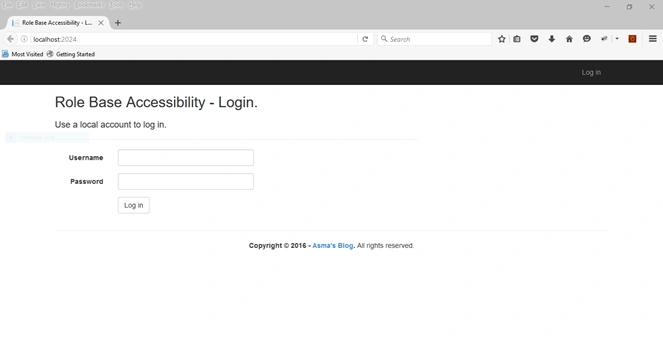
9. Execute the project and you will see the following:
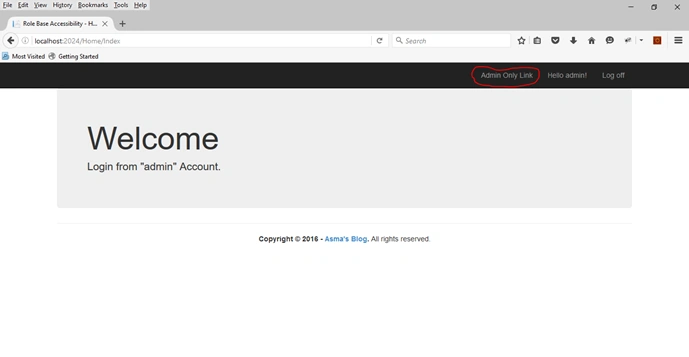
10. When you login as admin account you will able to see a link that only admin can see as follow:
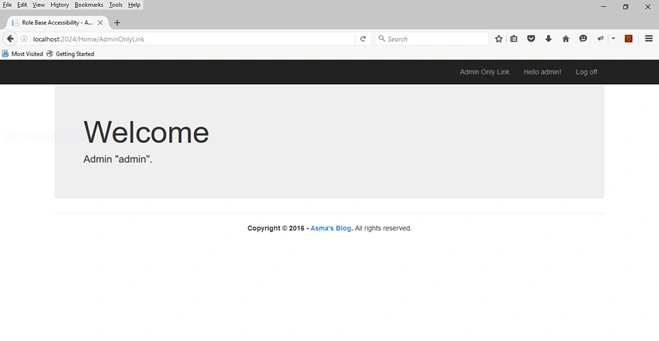
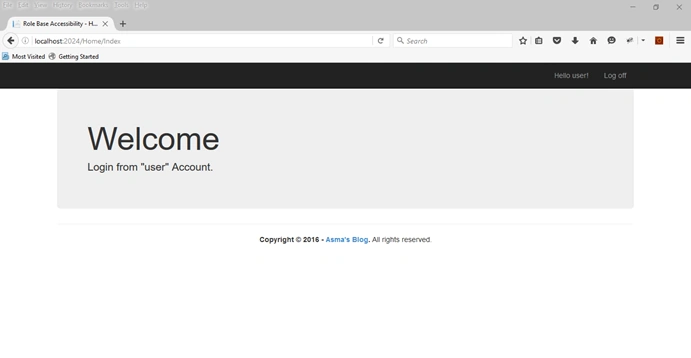
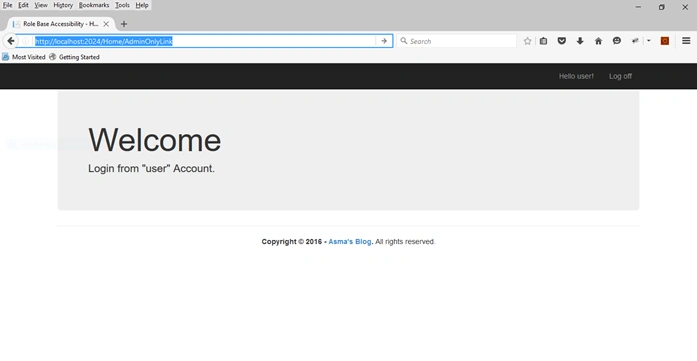
11. When you login as non-admin account you won't see the link that admin can see but, if you try to open the link which supposedly you do not have access of, you will be redirected to your home page as follow:
Conclusion
In this tutorial you learned how to use create role based accessibility. You also learned how you can encapsulate role based accessibility for multiple roles.
Sangram PattanayakPosted Nov 26, 2019, 1:13 AM
Very very thanks
Mohammed DilshadPosted May 2, 2018, 7:26 AM
How to set authorized role dynamically for an action, Example role=1 may later have access
Ramendra kumar vermaPosted Feb 23, 2018, 5:58 AM
If the sun is not rising with fog then not login is required
Ramendra kumar vermaPosted Feb 23, 2018, 5:56 AM
Can you provide automatic login and logout when the sun is rising and the sun is set
Kuldeep SinghPosted Feb 8, 2018, 6:29 AM
Logged out after few minutes, what I need to do to extend logout time?I tried this but nothing happened: <sessionState mode="InProc" timeout="120" />
ramesh supekarPosted Dec 1, 2017, 4:50 AM
Thank you for nice article , There are two problems I m facing for this when I logoff , 1. browser back button doen't redirect to login page 2. if multiple tabs open not signing out of other tabs can you please suggest solution for this.
Jamil MoughalPosted Mar 29, 2017, 8:52 AM
Very nice and informative article,
Amit DavePosted May 3, 2016, 10:31 AM
Keep up the Good work!
Humayun Kabir MamunPosted May 3, 2016, 2:53 AM
Nice...
Asma KhalidPosted May 2, 2016, 8:55 AM
@ Dhrumit Patel can you kindly elaborate the scenario.
Asma KhalidPosted May 2, 2016, 8:54 AM
Thank you everyone for the appreciation
Former memberPosted May 2, 2016, 8:22 AM
but when dynamic role created how achieve it..........
Bhuvanesh MohankumarPosted May 2, 2016, 6:55 AM
Nice
Sonu ChaudharyPosted May 2, 2016, 5:58 AM
Thanks for sharing
Gowtham RajamanickamPosted May 2, 2016, 2:45 AM
good one..
Thiruppathi RPosted May 2, 2016, 12:13 AM
Much useful..
Kuppurasu NagarajPosted May 1, 2016, 2:22 PM
Nice Sharing..